It’s been a while since I got some thoughts down about the current state of CALL and TELL in the era of AI. Here are a few of them, by no means exhaustive. Interested to hear others’ opinions on these considerations as usual.
What is the role of CALL (computer assisted language learning) or TELL (technology enhanced language learning)?
It’s to “assist” or “enhance” the learning of languages.
This has normally involved judiciously providing students with or depriving them of technological affordances such that they are better able to learn the target language.
My working definition of “learn a language” has been “to use and understand the language in a variety of situations without assistance”.
So technological assistance is a kind of scaffolding that will eventually be removed so that the learner no longer requires it and can use and understand the language without it.
When assessing whether a student has indeed “learned” the language, we often use technology while tightly controlling students’ access to it (consider standard assessments such as the TOEFL or IELTS).
The Internet, smartphones, and GenAI have challenged the assumption that the technological scaffolding will ultimately be removed, because most students now carry a device everywhere that can understand, translate and generate almost any language. In addition, Big Tech companies such as Google and Microsoft are baking AI into most of their existing communication services, both synchronous and asynchronous. There are a plethora of browser plugins to translate, transcribe or correct written and spoken webpage content. AI affordances affect not only “computer as a tutor” models of CALL/TELL but also “computer as a tool” models (e.g. automatic captioning and translation in Zoom meetings).
While we have traditionally separated the four skills of language learning into reading, speaking, listening, and writing, AI is now collapsing those distinctions, since any written text can instantly become a spoken one, and any spoken one a written one. Controlling students’ access to these technologies is difficult if not futile. Accessibility presents another curveball. You can’t “judiciously deprive” a hearing-impaired student of captions on a video, for example, even if that might be a legitimate exercise for non-hearing-impaired students.
It’s not hard to imagine a future where “smart glasses” become as ubiquitous as smartphones, heralding a new era of augmented reality, where information we cannot see or control is displayed before students’ eyes. Again, Big Tech companies like Meta and Google are already working on and pushing these products.
The struggle to understand the implications of all of the above for language teaching and learning approaches, methodologies, practices, and policies is a daily one; made harder by the fact that the ground seems to be shifting under our feet. Updating materials, syllabuses, and curriculums takes time, and technology moves much faster than educational bureaucracy.
Staking out a clear personal position on AI these days is a risky but necessary undertaking. AI has become one of the most controversial topics of our time, and will continue to be divisive as its impact on the economy, the environment, and the law becomes apparent. The controversiality of AI only intensifies when we consider its impact on education, which was already a very polarising topic.
While it would be nice to “wait and see” what happens before making clear our individual stances on AI, that’s not really possible since the technology is already out there. Pandora’s box is open. The horse has bolted. The cat is out of the bag. Pick your metaphor. Even if we educators would rather ignore it, we can’t, because our students are already using it.
It’s impossible to comprehensively cover all the common criticisms of AI in one sitting, but there are a few arguments that come up again and again that tend to make those of us who use AI in a moderate, judicious, and conscientious way feel unnecessarily guilty — and it’s worth taking the time to contend with them.
The “soulless” nature of AI texts
One oft repeated criticism of AI is that the texts it generates are “soulless”. If we exclude religious understandings of “soul” and assume this remark relates to the fact that AI is not conscious or sentient, then yes, it is clearly true. AI is a “calculator for words” and calculators do not have souls. However, not all forms of writing need to have “soul”. I would argue that genres such as purely factual, informative, or instructional writing constitute a niche where AI can excel without a soul. I am actually more concerned with attempts to make AI seem to have soul when it does not, which can be deceitful and disturbing. If we are using AI generated texts in our classes, we should be open and honest about that, but there is no reason why they cannot be a useful supplement to other more “soulful” human-authored materials.
Lack of respect for authors’ legal rights
Another argument connects to the idea that the legal rights of authors around the world have been ignored during the training process of some Large Language Models. LLMs like ChatGPT were literally trained on the whole of the publicly accessible Internet. These data sources were already being made readily available to any organisation with enough compute to make sense of them. Big Tech has always sought forgiveness rather than permission in its attempts to make Big Data more useful. It happened when Google scanned all the books in the public library (authors sued Google, Google won) and it’s happening again in the wake of OpenAI’s decision to train its models on the entirety of the open Internet.
While it would have been unworkable to consult with every blog author and forum poster to assemble a whitelist of only those who consented to having their writing included in the model, OpenAI should have proceeded with more caution and public consultation. They are, after all, being sued by numerous authors’ organisations. But this is a matter beyond the influence of the average educator, and will be hashed out in America’s courts between OpenAI’s attorneys and the attorneys bringing the class action lawsuits against them. If OpenAI are found to have breached copyright in the way they trained their models, then they will be dealt with in accordance with the relevant laws. But when it comes to texts generated by their models, I don’t see how it will be technically possible to show that any specific text violates any specific individual author’s copyright (beyond instructing it to generate a text in a well known author’s voice or style, and even this could be protected by parody or fair use exemptions).
The environmental impact of AI data centers
Another argument that rightly causes much concern is the impact of AI on the environment. AI is for sure a power hungry technology, and if that power is coming from non-renewable sources, that’s going to have a negative effect on the environment. Cooling the infrastructure required to run AI inference at scale also requires a lot of water, but many server farms are able to recycle the water they use. Even in cases where water is not recycled, it returns to the atmospheric water cycle and isn’t lost forever. In any event, environmental concerns are rightly high on the list of our reservations about AI. But there are plenty of other environmentally polluting industries that deserve just as much scrutiny. And none of them — other than AI — have the potential to come up with ways to reduce their own environmental impact.
The threat against our livelihoods
Finally, there are concerns about the impact of AI on our jobs and livelihoods. It’s natural to be worried about such things, and skeptical of claims by AI CEOs that AI is only good at tasks not jobs, or that AI will bring about more jobs that it takes away. Even if that’s true, it won’t be easy to retrain for these jobs, which are likely to require a very high degree of education and expertise.
But education is and will remain a human-centric social process. When we try to come up with a working definition of what it means to “learn”, it invariably involves being able to use, understand, and apply knowledge we have gained in an unassisted way. As educators, we need to utilise AI in a way that enhances the pedagogical process by supplementing human-centric teaching and learning, ensuring it does not negate or replace this process, or leave students in a position where they are totally reliant on technology and unable to write, speak, or think coherently without it.
In conclusion
I’ll end this post by reminding readers that I am not making light of AI’s potential negative impacts on the environment, economy, or authors’ legal rights. These are all very serious issues that need to be resolved by experts in their respective fields. Additionally, I am not an AI ideologue or fanatic by any means. I am open to changing my position on the issues I have highlighted above in accordance with emerging evidence. It is paramount to stay abreast of not only the technical but also the environmental, ethical, and legal implications of AI.
For now at least, in my career as an English language educator, I will continue to use AI to supplement and augment my human-centric lessons by having it do pedagogically beneficial things that I couldn’t hope to do by myself, with a view to making my teaching more engaging, effective and efficient.
The image accompanying this article was generated by AI. The text was entirely composed by the (human) author.
The COVID-19 pandemic has forever changed the way that we work and learn. The “new normal” in the 21st century is for students to engage with their teachers and peers in both physical and virtual learning environments. In the summer of 2022, Paul Raine and Raquel Ribeiro explored 6 different virtual worlds, and evaluated their viability for language teaching and learning. Only virtual worlds that run in a web-browser and have a free trial were selected for this project. In this article, we present the results of our investigation, with the hope that this information will be of interest to other language teachers looking to teach all or some of their classes online. A series of YouTube videos to accompany this article can be found here.
Overview
The following virtual worlds are review in this article:
*In April 2023, Wonder announced it would be shutting down. **In December 2022, Orbital announced it would be shutting down. ***Mozilla ended support for Mozilla Hubs on May 31st, 2024.
Spatial
Gather
Wonder
Orbital
Mozilla Hubs
Kumospace
Perspective
3D
Top-down
Top-down
Top-down
3D
Top-down
Audio & Video Chat
Yes
Yes
Yes
Yes
Yes
Yes
Text Chat
Yes
Yes
Yes
Yes
Yes
Yes
Screen Sharing
Yes – Embedded
Yes
Yes
Yes
Yes – Embedded
Yes
Customizable Avatar
Yes
Yes
No
No
Yes
No
Sticky Notes
Yes
No
Yes
Yes
No
No
Object Picker
Yes
Yes
No
Yes
Yes
No
Interactive Environment
Yes
Yes
No
No
Yes
No
Emoji Reactions
No
Yes
Yes
Yes
Yes
Yes
Mini Games
No
Yes
No
No
No
Yes
Web App
Yes
Yes
Yes
Yes
Yes
Yes
iOS App
Yes
No
No
No
No
No
Android App
Yes
No
No
No
No
No
Forever-free Plan
Yes
Yes
No – Free Trial
Yes
Yes
Yes
Best Feature
Dance moves
Mini Games
Randomise Users
Private Island
Laser Pen
Piano Music
Common Features
Perspective
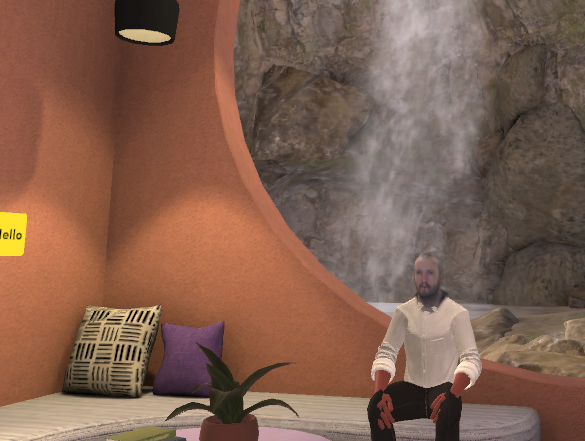
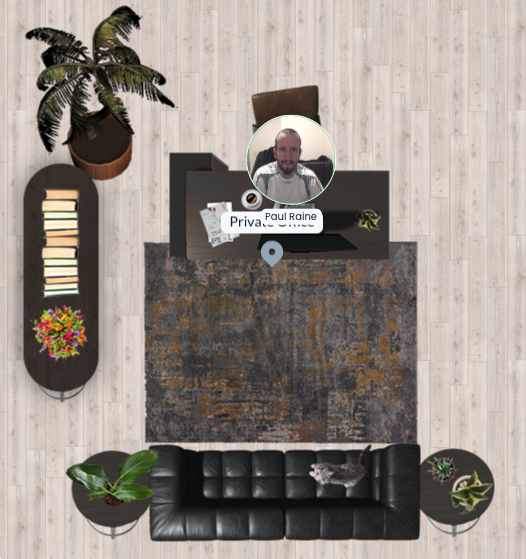
The virtual worlds (VWs) we evaluated for this report came in two different perspectives: top-down and 3D. Four of the six worlds had top-down perspectives, and two offered a full 3D experience.
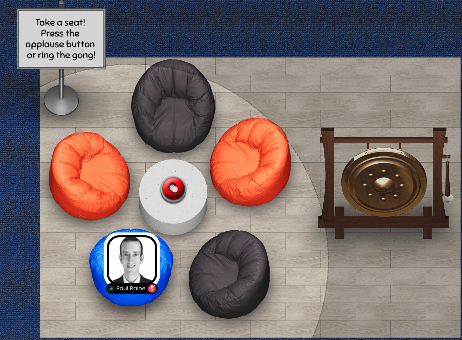
Figure 1: The top-down perspective of Kumospace
Figure 2: The 3D environment of Spatial
Audio and video chat
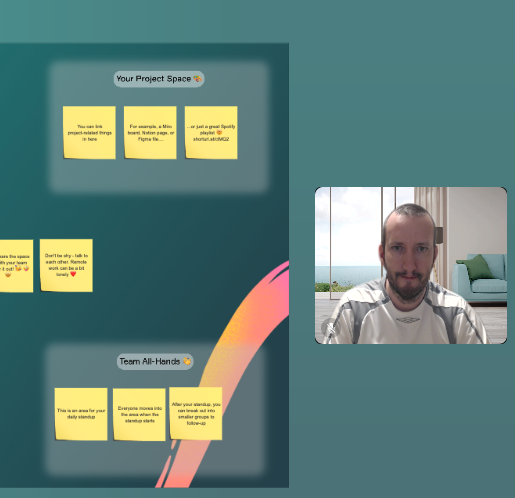
All the VWs we evaluated had the ability to chat via live video and audio with other members. In some VWs, the video stream was rendered as the user’s avatar, and in other VWs, the video was rendered above or to the side of the environment.
Figure 3: In Orbital, the user’s video stream is rendered as their avatar.
Figure 4: In Wonder, the user’s video stream is rendered above or to the side of the environment.
Text chat
All of the VWs we investigated in this study offered the ability to send text-based messages to other members of the environment. We found that the text chat was a very useful supplement to audio-visual teaching methods, especially when teaching new words with unfamiliar pronunciations.
Screen Sharing [Embedded]
All of the VWs in this study offered the ability to share a screen with other users in the environment. In Mozilla Hubs and Spatial, the shared screen was “embedded” in the environment such that users could choose to either continue interacting with each other, or view the shared screen from a variety of perspectives.
Figure 5: Sharing a screen in Spatial
Custom Avatar
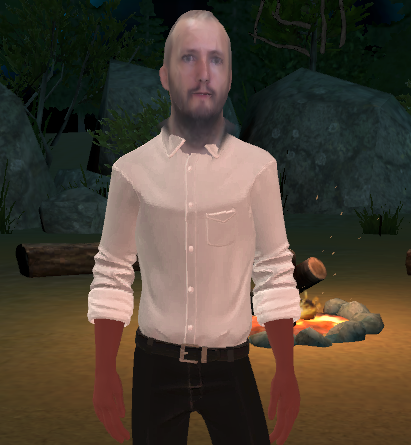
Some of the VWs we investigated allow the user to customise their avatar in various ways. The most advanced and personalised customization was offered by Spatial, which provided a way to convert a digital photograph into a 3D head for a user’s avatar.
Figure 6: Spatial offers the ability to convert a photo into a 3D head for a user’s avatar
Sticky Notes
Most of the VWs we investigated offered the ability to add “sticky notes” to the environment. These came in useful when teaching new words or phrases.
Figure 7: The “sticky note” function in Orbital
Interactive Environment
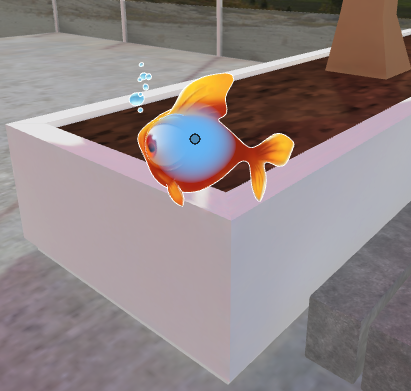
Some of the VWs we investigated offered the ability to interact with one’s environment. For example, by picking up and moving objects around. This feature could be used for teaching prepositions, by instructing learners to “put the goldfish on the wall” for example.
Figure 8: Interacting with a 3D goldfish in Mozilla Hubs
Mini Games
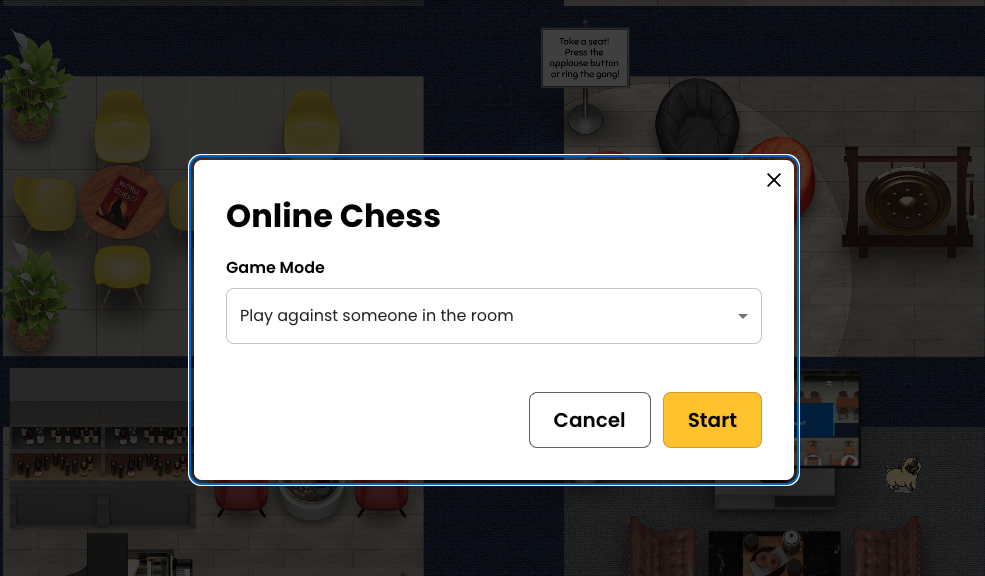
Two of the VWs we investigated featured “mini games” such as chess, which were completely contained within the virtual world. It is possible that these mini games could be used for spoken fluency practice by higher level language learners.
Figure 9: An invitation to play chess within the Kumospace virtual environment.
Object Picker
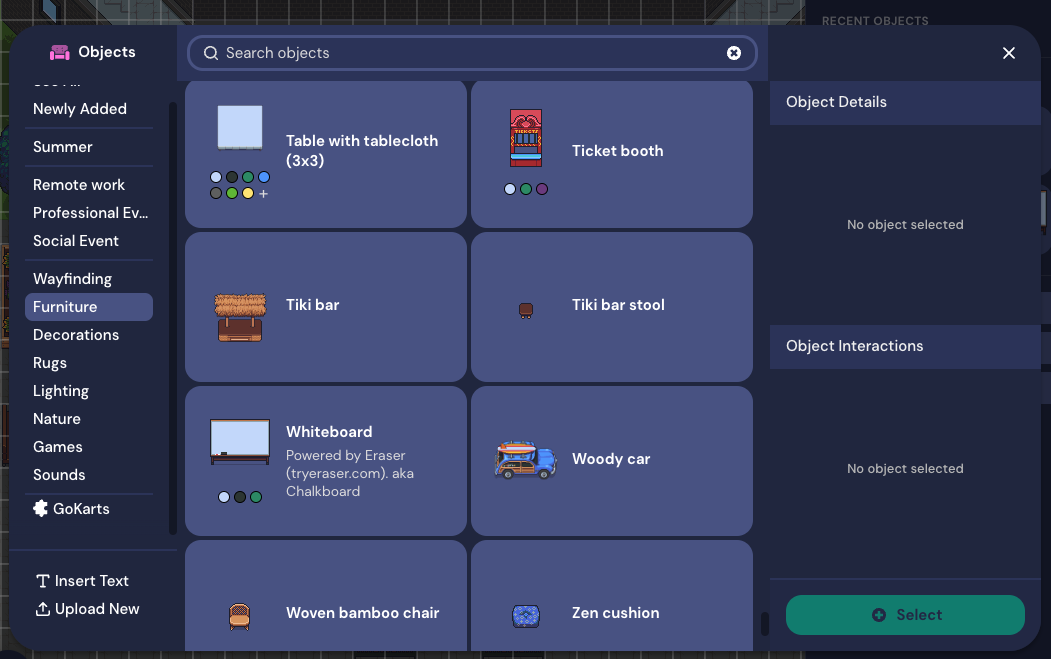
In addition to being able to interact with one’s environment, some VWs also offer an “object picker”, “designer”, or “build tool” that allows the user to add, remove, or change objects in the environment. This could either be used for introducing new vocabulary items, or for making the environment a more conducive space for language learning.
Figure 10: The object picker within Gather allows the user to add a wide range of weird and wonderful items to their virtual environment.
Emoji Reactions
Most of the VWs we investigated allow the user to react with a variety of emojis. These could be used for expressing comprehension, interest, or confusion when learning a language in a virtual environment.
Figure 11: Reacting with a “heart” emoji in Gather
General Suitability for Language Learning
The authors found that in general, it was possible to learn new foreign words and phrases inside of the VWs investigated in this study. This was verified in a rudimentary way by learning words and phrases in Portuguese and Japanese. One author had a native level of Portuguese, and attempted to learn some basic Japanese. The other author had an intermediate level in Japanese, and attempted to learn some basic Portuguese. Both authors were complete beginners in the language being taught to them.
It was found that the fidelity of the audio stream was of paramount importance in the language teaching and learning process. Where the quality of the audio was bad (such as in Spatial) it was sometimes not possible to distinguish between similar consonant sounds, such as “d” and “b”. For instance, when the Portuguese word for “chair” was first introduced, it was initially pronounced by the learner as “cabeira” whereas the correct pronunciation is “cadeira”. The authors found that the chat function could be used to clarify the pronunciation of unfamiliar words when the audio was insufficiently clear.
Specific Methodologies
Because both authors were complete beginners in the languages they were learning (Portuguese and Japanese) simple “show and tell” and “listen and repeat” methodologies were the main ones adopted in this preliminary investigation. In addition, Total Physical Response (TPR) was also briefly trialled, with one author being instructed by the other to “go closer to the tree” in Portuguese.
It is expected that, in reality, learners using VWs would not be complete beginners in the languages they are studying. Therefore, it seems reasonable that methodologies such as Communicative Language Teaching (CLT) or perhaps even Task Based Language Teaching (TBLT) could be adopted, and that this would result in improvements to communicative and pragmatic competence in a similar way that it would in real, physical classrooms.
Issues and Limitations
There were several issues and limitations with the current study. Firstly, the authors involved were living on opposite sides of the world, with a 12 hour time difference. This sometimes made it difficult to find a suitable time to meet up. It also caused occasional network issues.
In addition, the authors encountered some audio fidelity problems in the Spatial virtual environment, which interfered with the ability to clearly understand the correct pronunciation of unfamiliar foreign words.
Finally, only the two authors in this study were able to participate in the environments investigated. In real life situations, it is highly likely that there would be more participants in a language learning environment, including the teacher and perhaps 10 to 20 students. The effect that this number of users would have on the quality of the language learning experience is not known, and should be further investigated. Many of the VWs investigated in this study were specifically designed to handle a large number of concurrent users, and it would be interesting to see how the affordances of these virtual environments could be leveraged for larger classes.
Conclusion
Although Zoom has become the de facto application for online synchronous communication, it is not the only way to connect with people in remote locations in real time. The authors found many of the above virtual worlds to be just as reliable as Zoom and in most cases more visually engaging and stimulating. Language teachers might like to consider one or more of the above options in addition to or instead of Zoom for their online language classes.
As I donned the rather hefty Head Mounted Display (HMD) for the first time, I was half expecting to be whisked away to a minimalistic dojo where Laurence Fishbourne would slowly convince me that the world I had always known was an illusion.
That did not happen, and in fact there are a few little annoyances about using a Meta Quest 2 HMD to remind you that you are not in fact a lightsaber wielding Jedi. Getting the right level of tension on head straps is one challenge. Tight enough to block out the light that creeps through the nose hole, but slack enough to avoid completely crushing your cheekbones. Also, you’ll need a physical space at least a few meters squared (with no furniture) if you want to wield your virtual lightsabers without without destroying real world objects with your flailing arms. Indeed, the first order of business having put on the HMD is to set up your “Guardian” – a virtual boundary that reflects the limits of the physical space you are in, and is visible during gameplay as a futuristic neon mesh. However, I also recommend having a trusted friend or family member to act as a human guardian to ensure you don’t inadvertently walk into a table and bruise your shins. One of the handy features of the Meta Quest 2 HMD is the “passthrough” feature which allows you to see the real physical world at the same time as experiencing the virtual one. But for most games and apps, you’ll want full immersion to really appreciate the experience.
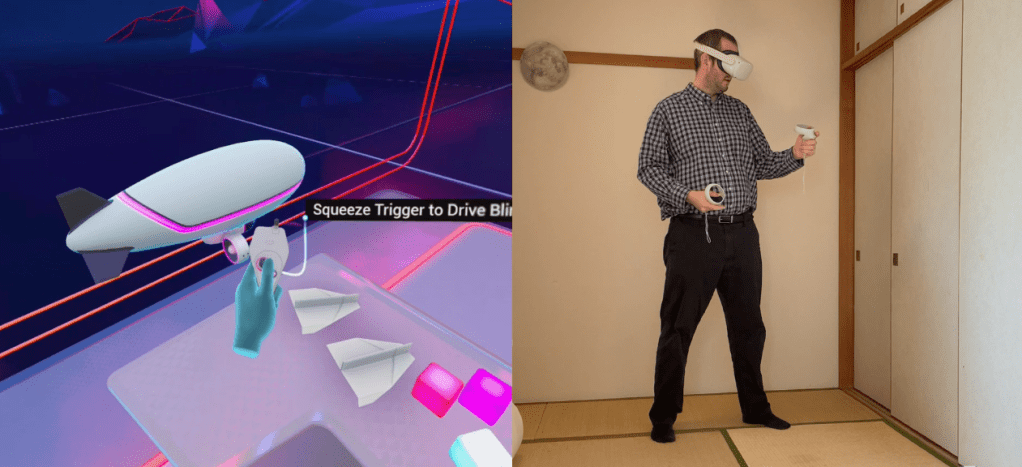
The First Steps app walks you through the Meta Quest 2 controls and how to use your “virtual hands”.
The first app you should try is appropriately called “First Steps”, and it is included with the Meta Quest 2 (MQ2). This app walks you through all of the buttons on the two hand-held controllers. The controllers also double as your VR hands, and provide you with the ability to pick things up and throw them around, and also give thumbs up and thumbs down (kudos to the Meta company for finally allowing a thumbs down reaction!). The first experience of the First Steps app is one of the most memorable, impactful, and engaging. It will make you laugh out loud at the pure peculiarity of being able to pick up and stack virtual blocks, knock them over with a virtual paper airplane, and then pilot a virtual airship with a virtual controller. Yes, in some games you are given a virtual controller that you control with your actual controller. It’s a little confusing but also a stroke of genius.
There are also a few other freebies included with the MQ2. Some VR TV programs that offer experiences like being an astronaut on the International Space Station, and some virtual animations that make you feel part of the action. In some of the VR TV programs, when the narrator looks directly at you, it is a very disconcerting experience indeed. It puts you well and truly in the uncanny valley. While one part of your brain is doing its best to remind you that it’s all VR, the social anxiety inducing part often remains unconvinced and it is bizarre having someone sit so close to you and look directly at you when they talk to you.
My MQ2 purchase also included Beat Saber, which I suppose is to the MQ2 as Sonic was to the Mega Drive or Street Fighter was to the Super Nintendo, i.e. the game that comes with the console and the one everyone plays first. Beat Saber is a VR version of one of those mobile games where you tap colored blocks to the time of a dance track. It makes you feel less like a Jedi and more like a baton-wielding cheerleader. In fact, I have a strong suspicion that those with a background in dance would actually be very good at the game, requiring as it does coordinated and formulaic movements to the time of music. One thing I can say for sure about the MQ2 — it’s an excellent riposte to those who (rightly) harp on about video games being one of the causes of obesity in the modern age. Most of the games I have played so far on the MQ2 require a lot of physical movement (especially with the arms) to slice, climb, or shoot your way to the end of the level.
Beat Saber requires you to slice cubes by dual wielding “lightsabers” to the time of the music
One of the things you’ll definitely want to set up early on is “Casting”, which enables you to see what the MQ2 user is seeing in Virtual Reality on your phone or computer screen. You can pair your MQ2 device with your smartphone via the Meta app. Doing this also allows you to open MQ2 apps from your smartphone, which is really useful if you are guiding someone else through the device for the first time. It’s also incredibly entertaining to watch someone else jerking their arms around in VR at the same time as seeing what’s happening within VR. At least, those jerking movements make a little bit more sense with context.
“The Climb” has breathtaking graphics, but is not for those who suffer from vertigo.
After you have exhausted all the freebies (or the freebies have exhausted you), you can fire up the MQ2 App Store, and get ready to input in your credit card details (in case you could ever forget that the MQ2 was developed by a profit seeking enterprise). Since it’s hard to read your credit card number whilst fully immersed in VR, this step can also be done via the Meta smartphone app. Most of the paid-for apps for the MQ2 retail for between ¥500 to ¥5000, and while there are currently far fewer apps than there are in the iOS store for example, I can only see this number increasing in the future. Apps and games cover a range of different categories, from simulations such as fishing and cooking, to brand name shooters such as Medal of Honor. Among the games I purchased were a climbing game aptly named The Climb, and a flying game named Ultrawings. The Climb has breathtaking graphics, and is not for those who suffer from vertigo. Ultrawings, on the other hand, gave me nausea almost instantly. I have since discovered that any game that requires the character to move around is nausea inducing for me, whether flying or walking, my brain just does not like the feeling of being told it is moving when it knows it is physically stationary. Other physical side effects also include eyestrain, which sets in for me after 30 mins or so.
The Meta Quest 2 App Store features a number of brand name and independent titles – but some of them can be nausea inducing.
All in all, I would say that my initial experience with the MQ2 was breathtaking and astounding, while also at times being disorienting and nauseating. I have no doubt that the MQ2 has educational applications that go beyond pure entertainment. As of now, I have not tried any applications that allow interaction with other MQ2 users, but I imagine it will be these interactions that will provide the basis for language learning opportunities. In addition, you could definitely have students write or speak about their experiences with the VR world: “I was a Jedi knight.. I went climbing in the Grand Canyon… I battled German soldiers”. It will certainly lead to more interesting speaking and writing assignments than the oft repeated “nothing special”.
The JALT CALL 2021 online conference took place from 4th to 6th of June 2021.
In case you missed it, here are some useful Tech Tips I picked up over the course of the weekend!
SPARQL is a semantic query language for databases which is able to retrieve and manipulate data stored in Resource Description Framework (RDF) format
According to the founders of Xreading, the following are both fallacies: “Cheaters are only hurting themselves” and “Japanese students don’t cheat”!
GIGAProject is a partnership between Japan and U.S. companies to help put the latest mobile devices in the hands of every Japanese student.
Some of the physical impacts of prolonged online learning include: eyestrain, backache, and fatigue:
Image from “Transitions and connections: student reflections on emergency remote teaching and learning (ERTL) in 2020” (Sandra Healy)
Universal Design is the design and composition of an environment so that it can be accessed, understood and used to the greatest extent possible by all people regardless of their age, size, ability or disability.
Miro provides an engaging, intuitive, in-person collaboration experience
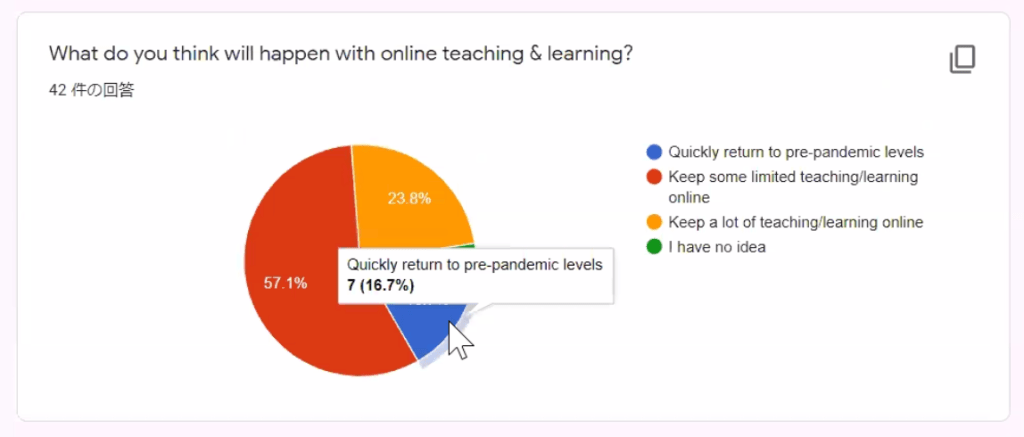
Most teachers surveyed at the JALT 2021 conference believe there will be some limited teaching and learning online after the COVID pandemic subsides:
Image from “Optimizing the future of language teaching with technology in Japan” (Betsy Lavolette)
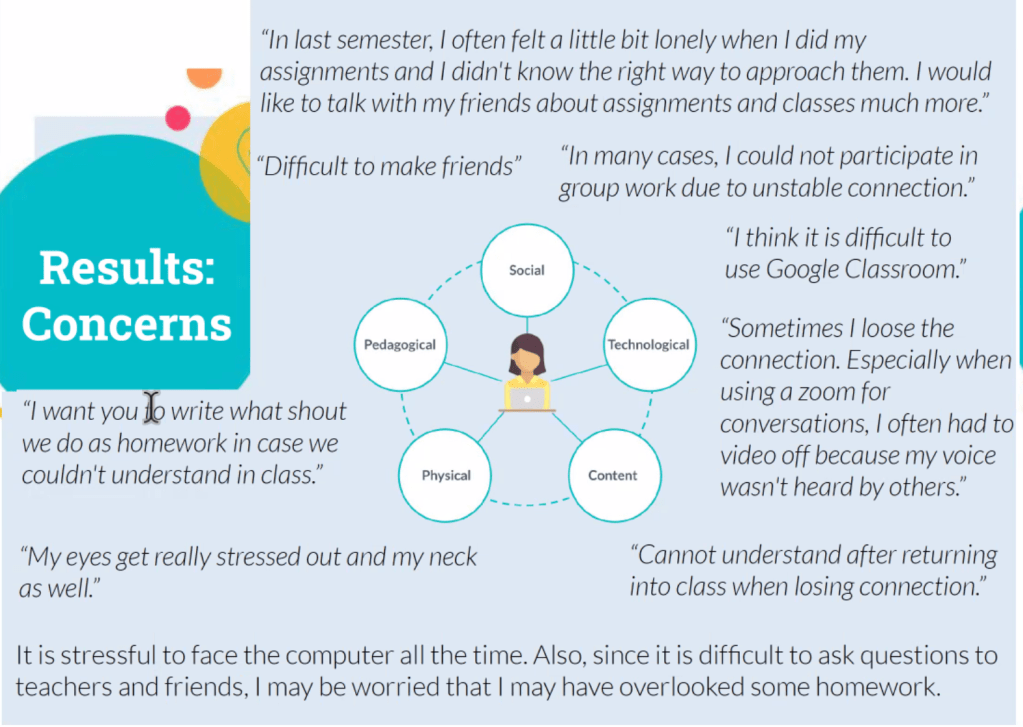
Students have various concerns about learning online, including Physical, Pedagogical, Social, Technological, and Content-related concerns:
Image from “EFL students’ perceptions and preferences of online learning: a Japanese higher education context” (Satchie Haga)
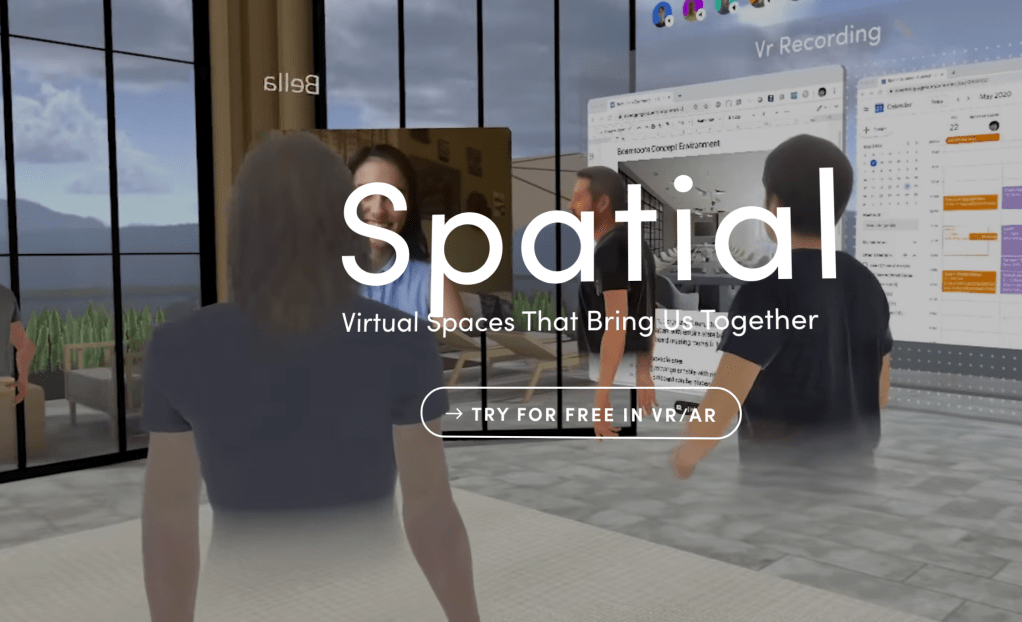
Spatial.io allows you to create a lifelike avatar and work as if your are next to your colleagues, utilizing VR and Augmented Reality
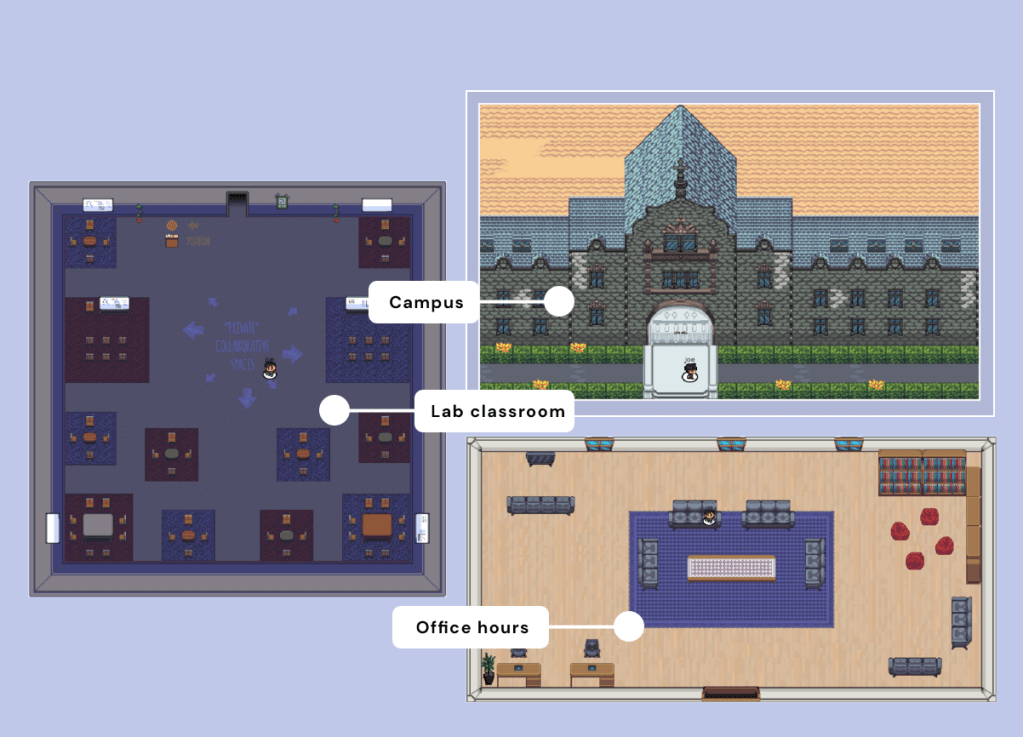
Gather is a video-calling space that lets multiple people hold separate conversations in parallel, walking in and out of those conversations just as easily as they would in real life.
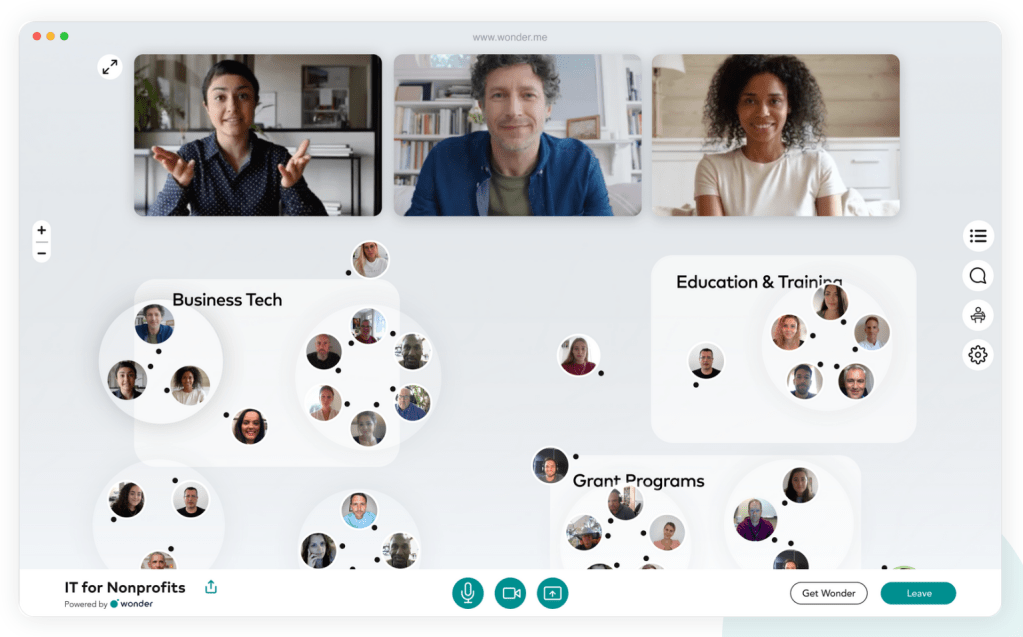
Wonder is a space where you can connect to others in a spontaneous and fluid way by moving around freely between groups. It’s fun, creative and energizing.
Run The World is a one-stop solution for virtual social gatherings, webinars and conferences that deliver engagement.
The ISTE Standards for Students are designed to empower student voice and ensure that learning is a student-driven process
VocabLevelTest.Org allows you to easily create and administer meaning-recall and form-recall vocabulary levels tests
Image from “Self-marking online form-recall and meaning-recall vocabulary tests” (Stuart McLean)
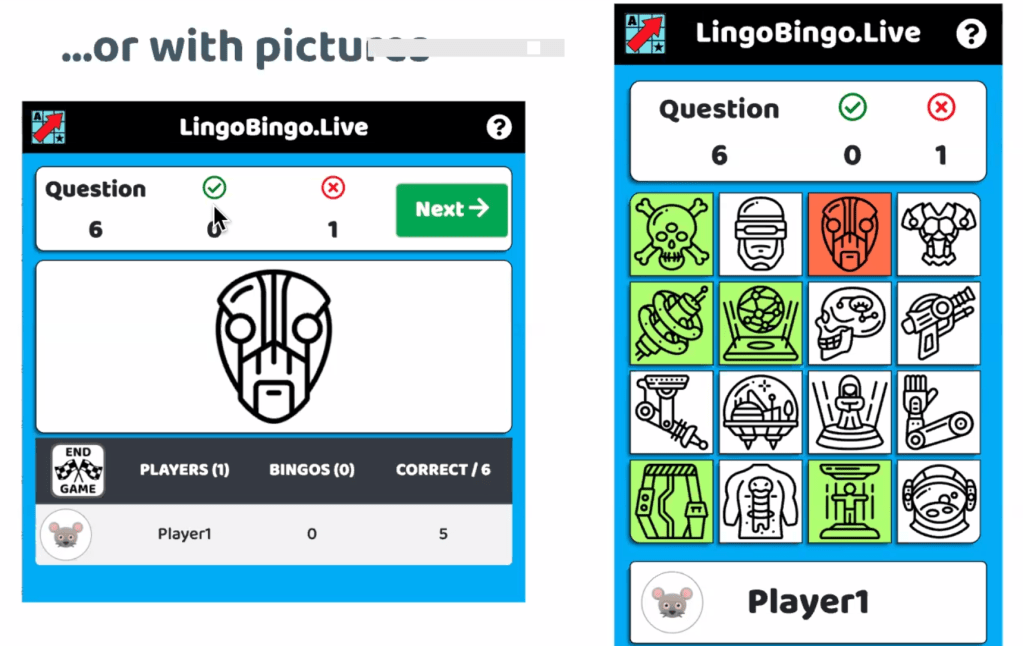
LingoBingo.Live allows students to practice listening and speaking in a live online game
Image from “Fun listening & speaking practice with LingoBingo.Live” (Oliver Rose)











 paulsensei.com