It’s been a while since I got some thoughts down about the current state of CALL and TELL in the era of AI. Here are a few of them, by no means exhaustive. Interested to hear others’ opinions on these considerations as usual.
What is the role of CALL (computer assisted language learning) or TELL (technology enhanced language learning)?
It’s to “assist” or “enhance” the learning of languages.
This has normally involved judiciously providing students with or depriving them of technological affordances such that they are better able to learn the target language.
My working definition of “learn a language” has been “to use and understand the language in a variety of situations without assistance”.
So technological assistance is a kind of scaffolding that will eventually be removed so that the learner no longer requires it and can use and understand the language without it.
When assessing whether a student has indeed “learned” the language, we often use technology while tightly controlling students’ access to it (consider standard assessments such as the TOEFL or IELTS).
The Internet, smartphones, and GenAI have challenged the assumption that the technological scaffolding will ultimately be removed, because most students now carry a device everywhere that can understand, translate and generate almost any language. In addition, Big Tech companies such as Google and Microsoft are baking AI into most of their existing communication services, both synchronous and asynchronous. There are a plethora of browser plugins to translate, transcribe or correct written and spoken webpage content. AI affordances affect not only “computer as a tutor” models of CALL/TELL but also “computer as a tool” models (e.g. automatic captioning and translation in Zoom meetings).
While we have traditionally separated the four skills of language learning into reading, speaking, listening, and writing, AI is now collapsing those distinctions, since any written text can instantly become a spoken one, and any spoken one a written one. Controlling students’ access to these technologies is difficult if not futile. Accessibility presents another curveball. You can’t “judiciously deprive” a hearing-impaired student of captions on a video, for example, even if that might be a legitimate exercise for non-hearing-impaired students.
It’s not hard to imagine a future where “smart glasses” become as ubiquitous as smartphones, heralding a new era of augmented reality, where information we cannot see or control is displayed before students’ eyes. Again, Big Tech companies like Meta and Google are already working on and pushing these products.
The struggle to understand the implications of all of the above for language teaching and learning approaches, methodologies, practices, and policies is a daily one; made harder by the fact that the ground seems to be shifting under our feet. Updating materials, syllabuses, and curriculums takes time, and technology moves much faster than educational bureaucracy.
Staking out a clear personal position on AI these days is a risky but necessary undertaking. AI has become one of the most controversial topics of our time, and will continue to be divisive as its impact on the economy, the environment, and the law becomes apparent. The controversiality of AI only intensifies when we consider its impact on education, which was already a very polarising topic.
While it would be nice to “wait and see” what happens before making clear our individual stances on AI, that’s not really possible since the technology is already out there. Pandora’s box is open. The horse has bolted. The cat is out of the bag. Pick your metaphor. Even if we educators would rather ignore it, we can’t, because our students are already using it.
It’s impossible to comprehensively cover all the common criticisms of AI in one sitting, but there are a few arguments that come up again and again that tend to make those of us who use AI in a moderate, judicious, and conscientious way feel unnecessarily guilty — and it’s worth taking the time to contend with them.
The “soulless” nature of AI texts
One oft repeated criticism of AI is that the texts it generates are “soulless”. If we exclude religious understandings of “soul” and assume this remark relates to the fact that AI is not conscious or sentient, then yes, it is clearly true. AI is a “calculator for words” and calculators do not have souls. However, not all forms of writing need to have “soul”. I would argue that genres such as purely factual, informative, or instructional writing constitute a niche where AI can excel without a soul. I am actually more concerned with attempts to make AI seem to have soul when it does not, which can be deceitful and disturbing. If we are using AI generated texts in our classes, we should be open and honest about that, but there is no reason why they cannot be a useful supplement to other more “soulful” human-authored materials.
Lack of respect for authors’ legal rights
Another argument connects to the idea that the legal rights of authors around the world have been ignored during the training process of some Large Language Models. LLMs like ChatGPT were literally trained on the whole of the publicly accessible Internet. These data sources were already being made readily available to any organisation with enough compute to make sense of them. Big Tech has always sought forgiveness rather than permission in its attempts to make Big Data more useful. It happened when Google scanned all the books in the public library (authors sued Google, Google won) and it’s happening again in the wake of OpenAI’s decision to train its models on the entirety of the open Internet.
While it would have been unworkable to consult with every blog author and forum poster to assemble a whitelist of only those who consented to having their writing included in the model, OpenAI should have proceeded with more caution and public consultation. They are, after all, being sued by numerous authors’ organisations. But this is a matter beyond the influence of the average educator, and will be hashed out in America’s courts between OpenAI’s attorneys and the attorneys bringing the class action lawsuits against them. If OpenAI are found to have breached copyright in the way they trained their models, then they will be dealt with in accordance with the relevant laws. But when it comes to texts generated by their models, I don’t see how it will be technically possible to show that any specific text violates any specific individual author’s copyright (beyond instructing it to generate a text in a well known author’s voice or style, and even this could be protected by parody or fair use exemptions).
The environmental impact of AI data centers
Another argument that rightly causes much concern is the impact of AI on the environment. AI is for sure a power hungry technology, and if that power is coming from non-renewable sources, that’s going to have a negative effect on the environment. Cooling the infrastructure required to run AI inference at scale also requires a lot of water, but many server farms are able to recycle the water they use. Even in cases where water is not recycled, it returns to the atmospheric water cycle and isn’t lost forever. In any event, environmental concerns are rightly high on the list of our reservations about AI. But there are plenty of other environmentally polluting industries that deserve just as much scrutiny. And none of them — other than AI — have the potential to come up with ways to reduce their own environmental impact.
The threat against our livelihoods
Finally, there are concerns about the impact of AI on our jobs and livelihoods. It’s natural to be worried about such things, and skeptical of claims by AI CEOs that AI is only good at tasks not jobs, or that AI will bring about more jobs that it takes away. Even if that’s true, it won’t be easy to retrain for these jobs, which are likely to require a very high degree of education and expertise.
But education is and will remain a human-centric social process. When we try to come up with a working definition of what it means to “learn”, it invariably involves being able to use, understand, and apply knowledge we have gained in an unassisted way. As educators, we need to utilise AI in a way that enhances the pedagogical process by supplementing human-centric teaching and learning, ensuring it does not negate or replace this process, or leave students in a position where they are totally reliant on technology and unable to write, speak, or think coherently without it.
In conclusion
I’ll end this post by reminding readers that I am not making light of AI’s potential negative impacts on the environment, economy, or authors’ legal rights. These are all very serious issues that need to be resolved by experts in their respective fields. Additionally, I am not an AI ideologue or fanatic by any means. I am open to changing my position on the issues I have highlighted above in accordance with emerging evidence. It is paramount to stay abreast of not only the technical but also the environmental, ethical, and legal implications of AI.
For now at least, in my career as an English language educator, I will continue to use AI to supplement and augment my human-centric lessons by having it do pedagogically beneficial things that I couldn’t hope to do by myself, with a view to making my teaching more engaging, effective and efficient.
The image accompanying this article was generated by AI. The text was entirely composed by the (human) author.
The COVID-19 pandemic has forever changed the way that we work and learn. The “new normal” in the 21st century is for students to engage with their teachers and peers in both physical and virtual learning environments. In the summer of 2022, Paul Raine and Raquel Ribeiro explored 6 different virtual worlds, and evaluated their viability for language teaching and learning. Only virtual worlds that run in a web-browser and have a free trial were selected for this project. In this article, we present the results of our investigation, with the hope that this information will be of interest to other language teachers looking to teach all or some of their classes online. A series of YouTube videos to accompany this article can be found here.
Overview
The following virtual worlds are review in this article:
*In April 2023, Wonder announced it would be shutting down. **In December 2022, Orbital announced it would be shutting down. ***Mozilla ended support for Mozilla Hubs on May 31st, 2024.
Spatial
Gather
Wonder
Orbital
Mozilla Hubs
Kumospace
Perspective
3D
Top-down
Top-down
Top-down
3D
Top-down
Audio & Video Chat
Yes
Yes
Yes
Yes
Yes
Yes
Text Chat
Yes
Yes
Yes
Yes
Yes
Yes
Screen Sharing
Yes – Embedded
Yes
Yes
Yes
Yes – Embedded
Yes
Customizable Avatar
Yes
Yes
No
No
Yes
No
Sticky Notes
Yes
No
Yes
Yes
No
No
Object Picker
Yes
Yes
No
Yes
Yes
No
Interactive Environment
Yes
Yes
No
No
Yes
No
Emoji Reactions
No
Yes
Yes
Yes
Yes
Yes
Mini Games
No
Yes
No
No
No
Yes
Web App
Yes
Yes
Yes
Yes
Yes
Yes
iOS App
Yes
No
No
No
No
No
Android App
Yes
No
No
No
No
No
Forever-free Plan
Yes
Yes
No – Free Trial
Yes
Yes
Yes
Best Feature
Dance moves
Mini Games
Randomise Users
Private Island
Laser Pen
Piano Music
Common Features
Perspective
The virtual worlds (VWs) we evaluated for this report came in two different perspectives: top-down and 3D. Four of the six worlds had top-down perspectives, and two offered a full 3D experience.
Figure 1: The top-down perspective of Kumospace
Figure 2: The 3D environment of Spatial
Audio and video chat
All the VWs we evaluated had the ability to chat via live video and audio with other members. In some VWs, the video stream was rendered as the user’s avatar, and in other VWs, the video was rendered above or to the side of the environment.
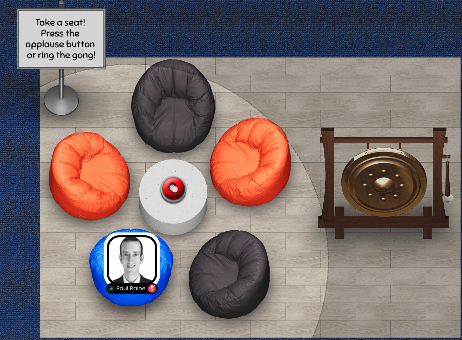
Figure 3: In Orbital, the user’s video stream is rendered as their avatar.
Figure 4: In Wonder, the user’s video stream is rendered above or to the side of the environment.
Text chat
All of the VWs we investigated in this study offered the ability to send text-based messages to other members of the environment. We found that the text chat was a very useful supplement to audio-visual teaching methods, especially when teaching new words with unfamiliar pronunciations.
Screen Sharing [Embedded]
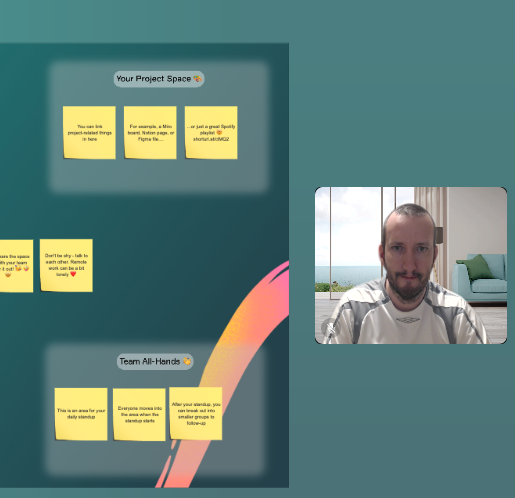
All of the VWs in this study offered the ability to share a screen with other users in the environment. In Mozilla Hubs and Spatial, the shared screen was “embedded” in the environment such that users could choose to either continue interacting with each other, or view the shared screen from a variety of perspectives.
Figure 5: Sharing a screen in Spatial
Custom Avatar
Some of the VWs we investigated allow the user to customise their avatar in various ways. The most advanced and personalised customization was offered by Spatial, which provided a way to convert a digital photograph into a 3D head for a user’s avatar.
Figure 6: Spatial offers the ability to convert a photo into a 3D head for a user’s avatar
Sticky Notes
Most of the VWs we investigated offered the ability to add “sticky notes” to the environment. These came in useful when teaching new words or phrases.
Figure 7: The “sticky note” function in Orbital
Interactive Environment
Some of the VWs we investigated offered the ability to interact with one’s environment. For example, by picking up and moving objects around. This feature could be used for teaching prepositions, by instructing learners to “put the goldfish on the wall” for example.
Figure 8: Interacting with a 3D goldfish in Mozilla Hubs
Mini Games
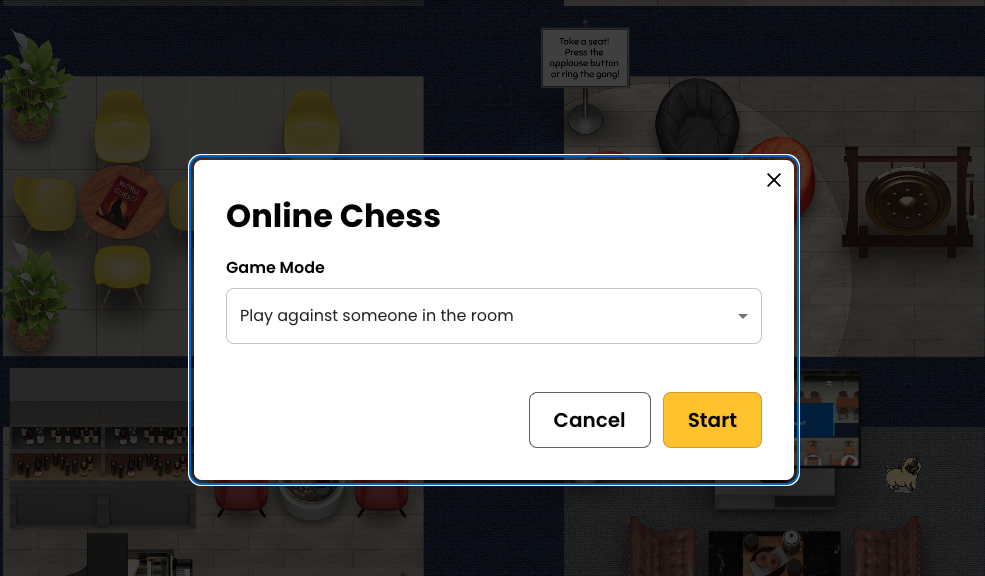
Two of the VWs we investigated featured “mini games” such as chess, which were completely contained within the virtual world. It is possible that these mini games could be used for spoken fluency practice by higher level language learners.
Figure 9: An invitation to play chess within the Kumospace virtual environment.
Object Picker
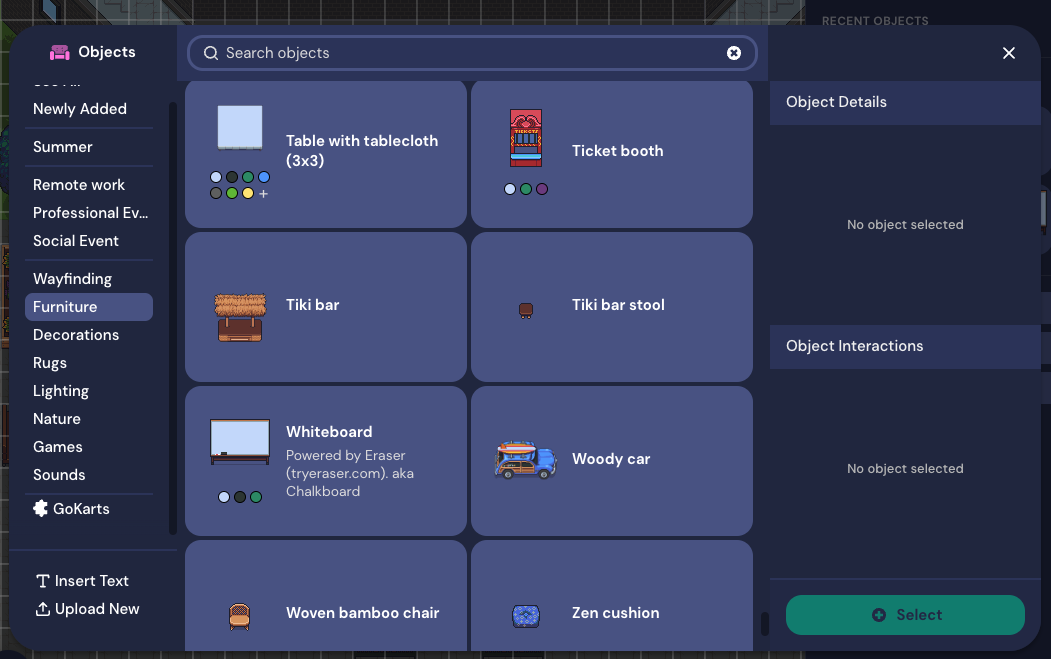
In addition to being able to interact with one’s environment, some VWs also offer an “object picker”, “designer”, or “build tool” that allows the user to add, remove, or change objects in the environment. This could either be used for introducing new vocabulary items, or for making the environment a more conducive space for language learning.
Figure 10: The object picker within Gather allows the user to add a wide range of weird and wonderful items to their virtual environment.
Emoji Reactions
Most of the VWs we investigated allow the user to react with a variety of emojis. These could be used for expressing comprehension, interest, or confusion when learning a language in a virtual environment.
Figure 11: Reacting with a “heart” emoji in Gather
General Suitability for Language Learning
The authors found that in general, it was possible to learn new foreign words and phrases inside of the VWs investigated in this study. This was verified in a rudimentary way by learning words and phrases in Portuguese and Japanese. One author had a native level of Portuguese, and attempted to learn some basic Japanese. The other author had an intermediate level in Japanese, and attempted to learn some basic Portuguese. Both authors were complete beginners in the language being taught to them.
It was found that the fidelity of the audio stream was of paramount importance in the language teaching and learning process. Where the quality of the audio was bad (such as in Spatial) it was sometimes not possible to distinguish between similar consonant sounds, such as “d” and “b”. For instance, when the Portuguese word for “chair” was first introduced, it was initially pronounced by the learner as “cabeira” whereas the correct pronunciation is “cadeira”. The authors found that the chat function could be used to clarify the pronunciation of unfamiliar words when the audio was insufficiently clear.
Specific Methodologies
Because both authors were complete beginners in the languages they were learning (Portuguese and Japanese) simple “show and tell” and “listen and repeat” methodologies were the main ones adopted in this preliminary investigation. In addition, Total Physical Response (TPR) was also briefly trialled, with one author being instructed by the other to “go closer to the tree” in Portuguese.
It is expected that, in reality, learners using VWs would not be complete beginners in the languages they are studying. Therefore, it seems reasonable that methodologies such as Communicative Language Teaching (CLT) or perhaps even Task Based Language Teaching (TBLT) could be adopted, and that this would result in improvements to communicative and pragmatic competence in a similar way that it would in real, physical classrooms.
Issues and Limitations
There were several issues and limitations with the current study. Firstly, the authors involved were living on opposite sides of the world, with a 12 hour time difference. This sometimes made it difficult to find a suitable time to meet up. It also caused occasional network issues.
In addition, the authors encountered some audio fidelity problems in the Spatial virtual environment, which interfered with the ability to clearly understand the correct pronunciation of unfamiliar foreign words.
Finally, only the two authors in this study were able to participate in the environments investigated. In real life situations, it is highly likely that there would be more participants in a language learning environment, including the teacher and perhaps 10 to 20 students. The effect that this number of users would have on the quality of the language learning experience is not known, and should be further investigated. Many of the VWs investigated in this study were specifically designed to handle a large number of concurrent users, and it would be interesting to see how the affordances of these virtual environments could be leveraged for larger classes.
Conclusion
Although Zoom has become the de facto application for online synchronous communication, it is not the only way to connect with people in remote locations in real time. The authors found many of the above virtual worlds to be just as reliable as Zoom and in most cases more visually engaging and stimulating. Language teachers might like to consider one or more of the above options in addition to or instead of Zoom for their online language classes.
Advances in both Natural Language Processing (NLP) and Automatic Speech Recognition (ASR) have raised the question of whether AI-powered chatbots could be an alternative or supplement to flesh-and-blood human teachers in some situations. Can these tools really help learners acquire foreign languages?
From the malevolent Hal 9000 in Stanley Kubrick’s 2001: A Space Odyssey to the charming Samantha in Spike Jonze’s Her, computers that talk have shocked and seduced us in popular culture for many decades.
Spike Jonze’s Samantha (pictured) developed an intimate relationship with its (her?) owner
When Apple officially incorporated their voice assistant Siri into iOS in 2011, the reality of having an intelligent assistant that understood and obeyed our every word seemed one step closer for everyone.
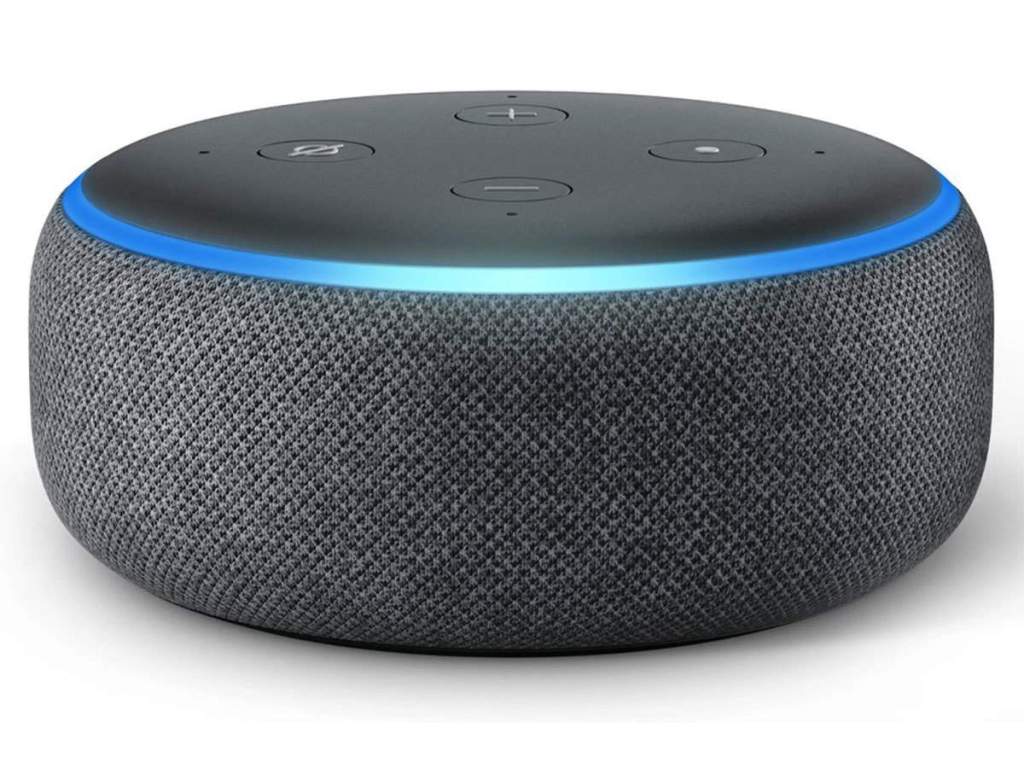
The Amazon Echo “smart speaker” hit the market in 2014, and has been the dominant device in that field ever since. Other products in the same space include Google’s Nest, and Apple’s HomePod. Social networks also started to jump on the AI assistant bandwagon, with Facebook incorporating chatbots into its Messenger platform in 2016, and LINE releasing the Clova assistant in 2017.
Smart Speakers such as Amazon’s Echo (pictured) have been gaining popularity since 2014
Advances in both Natural Language Processing (NLP) and Automatic Speech Recognition (ASR) have raised the question of whether AI-powered chatbots could be an alternative or supplement to flesh-and-blood human teachers in some situations. Can these tools really help learners acquire foreign languages?
General purpose AI assistants for language learning
The applicable theory of language learning to bear in mind here is interactionism – the idea that languages are acquired by interacting with other speakers of those languages.
Even though smartphone and smart speaker based AI assistants haven’t usually been designed specifically with language learning in mind, some innovative teachers and researchers have used them for these purposes. One of the major issues to overcome here is the fact that these assistants aren’t optimized for non-native speech, and may struggle to correctly transcribe or understand it.
Research has shown that the tech behind these devices can recognize non-native speech to some extent (with Google Assistant recognizing 87% of learner utterances and Apple’s Siri recognizing 67% in one Japan-based study).
So if a language learner is able to speak clearly enough for an AI assistant to understand them, what kinds of activities can be done to bring about further gains in language ability?
The applicable theory of language learning to bear in mind here is interactionism – the idea that languages are acquired by interacting with other speakers of those languages.
Interacting with another person with language involves taking turns, negotiating meaning (figuring out what the other person is trying to say), and an information gap (transferring information from one speaker to another). There is no reason in theory why the tenets of interactionism cannot apply to human-computer interaction as well as human-human interaction.
General purpose AI assistants can stand in for human interlocutors in interview or quiz type activities, especially where the learner is asking the questions. However, the interaction tends to become one-sided, because AI assistants don’t ask questions unless programmed to do so.
And while learners may receive implicit feedback on pronunciation or grammatical form where the AI doesn’t understand the question that has been uttered, they won’t receive explicit feedback unless they are using an app that has been specifically designed for language learners.
AI assistants specifically designed for language learning
There have been several attempts to develop AI assistants and other interactive speech apps specifically for language learners. Here we will take a look at some of these products and services, and evaluate their usefulness and effectiveness.
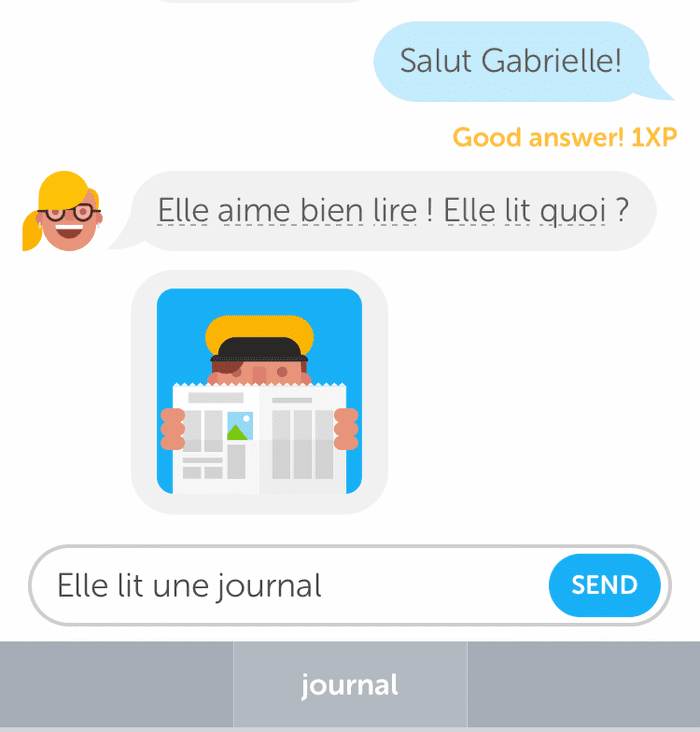
Duolingo Chatbots
Duolingo launched chatbots for its iOS app back in 2016, promising to help users “come up with things to say in real-life situations”. Although the feature seemed to be well received by its users, it quietly slipped away and there is no sign of it returning yet.
Duolingo’s chatbots included a “Help me reply” feature, which would suggest words and phrases for the learner to use in their responses. The interactions with the chat bots would become more advanced as the users’ level progressed. There were some limitations to Duolingo’s chatbots though. For example, they only offered structured dialogues, as opposed to open-ended speech.
Duolingo’s chat bots (iOS only) promised to help users “come up with things to say in real life situations”.. but the feature quietly slipped away and shows no sign of returning
In December 2020, ETS released Elai (iOS/Android), an app that allows users to practice speaking about a range of topics and receive feedback on their speech.
Elai includes model answers from other learners and native speakers, and also provides tips for learners who want to repeat the same exercise.
Unlike Duolingo chatbots, Elai’s focus is on open speech. Users must respond to a prompt and record their answers within a 30 second time limit.
Elai offers a variety of feedback on learner speech, including the extent to which the learner repeated the same words; how often the learner paused in during their speech; and whether or not the learner used a lot of “filler” words, e.g. “uh”, “erm”, “ah”.
Elai attempts to improve the speaker’s vocabulary knowledge by providing a list of higher level words at the end of the exercise, which could also be used to respond to the prompt.
Elai is still in Beta status, and the extent to which it will be embraced by learners, teachers, and researchers is still an open question, but being developed by one of the world’s largest English language testing companies (ETS is behind the TOEFL and the TOEIC) certainly puts it in a strong position from the outset.
Buddy.ai
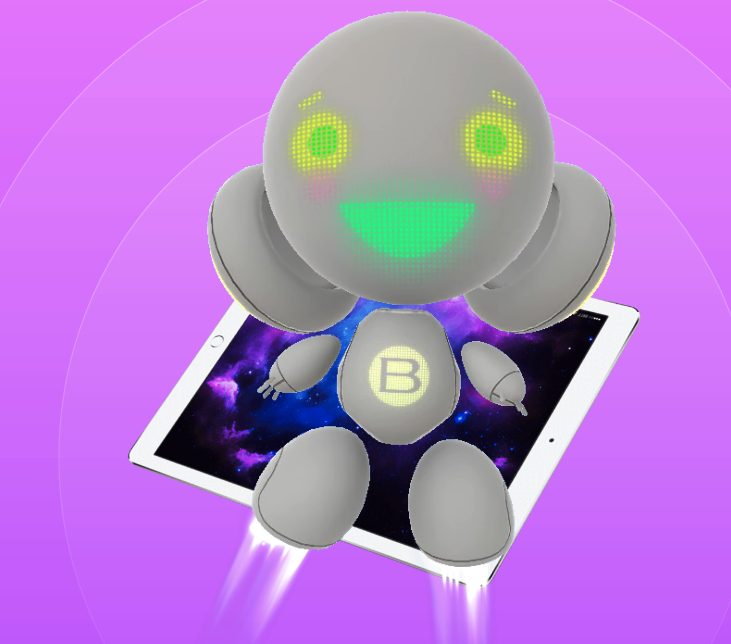
Buddy.ai is aimed specifically at young learners of English
One of the drawbacks of the app, however, is that it only supports users with Russian, Spanish, Turkish and Polish as a first language. The app has a bilingual interface, and if the user has a first language other than one of these four, they will struggle to understand the instructions.
ELSA
Elsa (iOS/Android) is a mobile app that focuses specifically on improving the users pronunciation to help them “speak like an American” (although proponents of TEFL Equity might have something to say about this – should “American” be the target for all English learners?).
Through listen-and-repeat and interactive dialogue type exercises, Elsa teaches the user how words are blended together in casual speech, which in turn helps to improve the user’s fluency.
Summary
The principles of interactionism suggest that language learners can improve their skills simply by conversing with another speaker of the target language. However, there are issues to be overcome when using AI-powered virtual assistants for language learners, including lack of optimization for non-native speech, and lack of true discourse-level interaction.
Apps that specifically target language learners can do better when it comes to recognizing non-native speech, and offering more life-like interactions.
English Central, for example, is one of the leaders in the recognition of non-native speech, and gives users instant feedback on their pronunciation and fluency while speaking lines from a library of thousands of videos.
However, many of the other apps discussed here focus on either niche segments of learners (e.g. Russian and Polish speaking children) or niche language language skills (such as fine-grain pronunciation problems).
There is yet to emerge an artificially intelligent chatbot which can be used by all levels and all ages of learners that offers true human-like interaction and feedback.
In addition, student reactions to the recent COVID pandemic have shown that many students value face-to-face learning over online methods. Although chatbots and smart speakers could be a useful supplement to face-to-face or online learning with a human teacher, it seems unlikely that they will be a complete replacement for human teachers any time soon.
Learn-English.Org is a free website for learners of English to practice listening, speaking, reading, and writing online, anywhere, anytime!
How do I use Learn-English.Org?
Find an activity you would like to study by using the navigation panel on the left. There are three ways to navigate the activities on this site: by category, by skill, and by level.
This site is produced and developed by English language and Ed-Tech experts, and powered by TeacherTools.Digital, an innovative digital assignment creation platform for language teachers.











 paulsensei.com