I have generated supplementary data for four word lists (NGSL, NAWL, TSL, and BSL) originally created by Dr. Charles Browne et al. The supplementary data includes:
Word: the word (lemma) as it appears on the original list
The final list consists of 3,773 high frequency TOEFL words, and can be downloaded here.
Step 1: Assemble a corpus of TOEFL materials
For my corpus, I used material from both the older CBT (Computer Based Test) and the current iBT (Internet Based Test). I found most of the materials online for free. Some were already in plain text format, but most were PDFs and required Optical Character Recognition (OCR) to convert to plain text. I used ABBYY’s FineReader Pro for Mac, but there are plenty of other options out there too. Some files were Microsoft Word format (.doc/.docx), and MacOS X’s batch conversion utility came in hand for these. I included model answers, listening transcripts, reading passages and multiple choice questions (prompts, distractors and answers). I tried to exclude explanations, advice and instructions from the authors and/or publishers.
Ultimately, I ended up with corpus just shy of a million words (959,124 to be precise). In general, bigger is better when it comes to corpus research. The TOEIC Service List (TSL) utilizes a corpus of about 1.5 million words, so my TOEFL corpus seems roughly comparable to this.
Step 2: Count the number of occurrences of each word
I used some custom PHP code to process my corpus data (although Python is probably more suited for corpus analysis). I lemmatized each token where possible using Yasumasa Someya’s list of lemmas. I then cross referenced each lemma occurrence with the NGSL, NAWL and TSL. Finally, I exported to a CSV, and ended up with 13,287 rows of data.
Step 3: Curate the final list
For my final list I removed any words which also appear on the NGSL, any contractions (e.g. “Don’t”,”I’m”,”that’s”), any numbers written in word form (e.g. “two”,”million”), any vocalizations (e.g. “uh”,”oh”), any ordinals (e.g. “first”,”second”,”third”), any proper nouns (“James”, “Elizabeth”, “America”, “San Francisco”, “New York”), and any words with fewer than 5 occurrences in the corpus. Next, I ran the list through a spell checker, and excluded any unrecognized words. I also excluded any non-lexical words, to leave a list consisting only of nouns, verbs, adjectives and adverbs.
The video for my recent presentation at JALT International conference is now available! Error Spotter is a new web-app for improving students’ recognition of English grammatical errors.
Bring Your Own Device (BYOD) can allow teachers to use technology where it would otherwise be unavailableBYOD (Bring Your Own Device) is the only solution for educators who wish to use technology in the classroom when access to a CALL lab or institutional set of devices is not available.
Almost all university freshmen in Japan now possess a smartphone of some description. These are generally either iPhones running iOS or OEM handsets running Android. iOS seems to be somewhat more popular in Japan, but there are still a fair number of students with Android handsets, and a few with rarer hardware/software combinations.
If you are relying on BYOD for your tech-powered teaching, the fact that not all your students will have the exact same device is where your problems begin, but not, unfortunately, where they end.
This might not be a problem for individual users, but it becomes a major issue when leading a group of students in lock-step through a structured learning process. The fact that the “user experience” is inconsistent means that there is no single set of instructions that all students will be able to follow. The fact that developing for every possible OS/handset combination is a challenge means that many apps only run on the latest OS versions of the most popular handsets.
So, although every student may possess a smartphone, not every smartphone will be able to run the cool CALL app you have in mind. Even if they can, you will either have to give individual support to every student in helping them set up the activity, or create multiple iterations of the instructions to cover every OS/device eventuality.
Mobile devices are cornucopias of personal and private dataPrivacy
Unlike institutionally owned devices, which can be easily wiped after the user logs out or finishes the class, student owned devices contain a trove of personal data: photos, messages, appointments, contact information, and more.
Most students would probably feel uncomfortable sharing at least some of this information with their teachers. So when we walk around the room monitoring students to make sure they are on-task, or helping them set up the mobile-based CALL activities, we have to be careful not to inadvertently peek into the personal lives behind the tiny glowing screens in their hands.
Distractions
Ever since Apple overhauled the iOS notification system, it seems that every app and its dog wants to send me updates, offers, news and status reports. While I endeavor to disable notifications for any app that doesn’t absolutely need them, my students tend to be less discerning. There’s nothing worse than setting up a class activity on mobile devices, only to have students navigate away from the app or site the moment a giant emoji-laden message drops down from the top of the screen. Even the students who diligently dismiss annoying messages from friends must find them a distraction from the learning process.
And I haven’t even begun to mention the students who will double click the home button and go back to Candy Crush the minute you’re not hovering over their shoulders and spying on their screens.
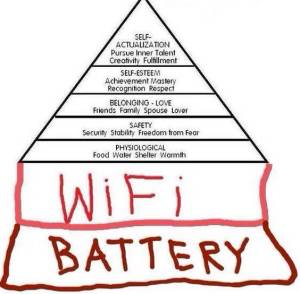
The millennial version of Maslow’s hierarchy of needsBattery
The modified version of Maslow’s hierarchy of needs now puts battery life right at the bottom of the pyramid, directly below “Wi-Fi”. Yes, this a sarcastic dig at millennials’ seeming inability to pull themselves away from their devices and do something healthy like.. climb a tree. However, in the CALL-based EFL classroom, it is a very pertinent observation.
Battery life hasn’t really improved as much as we’d like in recent years, and certainly not as much as storage capacity or processor speeds. It seems that battery life isn’t subject to Moore’s law, as the science behind it is based on thermodynamics rather than electrodynamics.
This means that students, who are already heavy mobile users, may simple not have enough juice to utilize their devices during study time as well as break time. Where this is the case, you’d better hope that you have enough power outlets and charging cables to get them hooked back up to the mainline.
Data
Capped data plans on mobile are generally the norm these days. There may be actual technological reasons behind this, but the cynical side of me suspects it’s just the carriers trying to milk heavy users for more money.
In any event, if you don’t have an easily accessible Wi-Fi network in your classroom (which isn’t restricted to just teachers) and you’re asking students to use their own data connections to engage with your chosen app or website, you have to be careful not to inadvertently incur additional charges for your students. Usually they will be quick to let you know when this is the case, but it can be yet another barrier to the successful exploitation of BYOD.
Summary
If you can overcome the difficulties presented by various models of various handsets running various versions of various operating systems, and all students have a fully juiced up device with plenty of bandwidth, and they are able to pull themselves away from Candy Crush, and ignore messages from their friends in other classes, then BYOD can be a good way to gain access to mobile technology in the classroom.
However, we must be careful not to appropriate students personal (and often private) devices as our own teaching tools, despite how cool that new ELT app may be.
I was honored to receive a Best of JALT award for my presentation on Apps 4 EFL at the Nakasendo English Conference 2015. I’d like to thank the organizers of Saitama JALT for inviting me to give the plenary presentation, and for nominating me for this award. In particular I’d like to thank Matt Shannon, Tyson Rode, and Rob Rowland – you guys are awesome! Thanks!
 For my corpus, I used material from both the older CBT (Computer Based Test) and the current iBT (Internet Based Test). I found most of the materials online for free. Some were already in plain text format, but most were

 paulsensei.com